


TroutRoutes: Trout Fishing App
3.3343.00 Reviews
App Specs
- Version
- 5.15.0
- Updated On
- License
- Free
- Downloads
- 100,000+
- Developer
- onXmaps
- Categories
- Maps & Navigation
- Platform
- Android
Screenshots
 Analysis by AppCompare
I judge a fishing map by what it helps me decide before I leave home and how useful it remains once I reach the water. TroutRoutes is a focused navigation app for anglers who want to explore trout streams rather than browse general-purpose maps. Its appeal is practical: it brings fishing-oriented map information, stream details and flow rates into one place. I would treat it as a planning aid, not a promise that a particular stretch will be productive. Conditions change, and a map can narrow the search without making the decisions that still depend on weather, water and your own judgment.
What I would check before heading out
The strongest reason to try TroutRoutes is its specific focus on trout water. A regular map is good at showing roads and broad geography, but it may not help much when the question is which nearby stream is worth investigating or how to think about access. TroutRoutes is built around those angling decisions. Its maps and flow information can help turn a vague plan—“find somewhere to fish”—into a shortlist of waters to research further.
I would use that shortlist to compare options, then check current local rules and conditions before setting off. Flow information is useful context, not a guarantee that a river will be comfortable or safe to fish at the time you arrive. Likewise, a mapped access point should be treated as a lead to verify, not permission to cross private land. That distinction is important: the app can reduce search time, but responsible access and a final check of regulations remain the angler’s job.
How the map fits a real fishing day
Imagine I have a free afternoon, limited daylight and no desire to spend the first hour driving between possibilities. I can use the map at home to identify trout water in the area, look at the flow context and decide which location deserves a closer look. Before leaving, I would save the relevant map information for offline use if my plan takes me beyond reliable service, and keep the route and access details in mind rather than assuming the phone will solve every navigation problem on the bank.
That workflow is more useful than simply opening the app after I arrive. A little preparation lets me spend less time searching on the roadside and more time deciding how to approach the water. If the first spot looks unsuitable, having another candidate already in mind gives me a practical fallback. I would still carry ordinary essentials and use sound outdoor judgment; an app is not a substitute for knowing where I am, watching conditions or having a safe way back.
Performance expectations: maps first, not magic
Because the central task is exploring maps and fishing information, I would expect the app to feel most responsive when I have a clear area in mind and use it to inspect that area deliberately. Zooming around without a plan, especially while comparing many possible streams, can make any map-based research feel slower and more demanding. I prefer to narrow the search at home, then use the phone for targeted checks in the field. That approach also avoids treating a small screen as a replacement for careful trip planning.
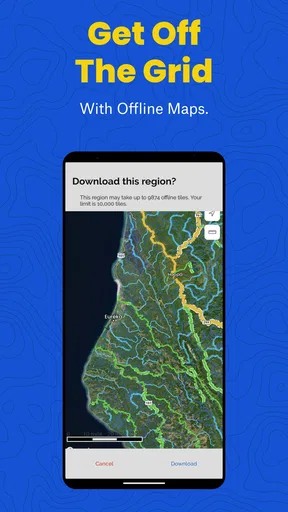
For remote outings, offline map access is a meaningful advantage when prepared in advance. It changes the role of the phone from a device that must keep reaching a network into a reference I can consult where service is absent. I would make offline preparation part of the departure routine, alongside checking the intended area and confirming that the information I need is available. It is a useful safeguard, but it does not mean every detail updates without connectivity or that a saved map can report changing conditions.
Worth Reading Before You Choose

EA SPORTS FC Mobile 26 Is a Bigger Football Game, but It Takes Time

Flipboard Shows What News Apps Must Do Beyond the Feed

Switching to Android Auto Means Rethinking Your Driving Routine

Google Calendar Makes a Crowded Week Easier to Manage

Ludo King Makes the Most of the Minutes Between Plans

Baby Panda World Brings Quick Play to Modern Phones, but Its Game Library Feels Busy
Where it sits among fishing and navigation apps
Compared with a general navigation app, TroutRoutes is more relevant when the question is about trout streams and fishing-oriented planning; a standard map may still be better for ordinary driving directions or broad route planning. Compared with piecing together information from separate maps and searches, a dedicated fishing app can reduce the number of places I need to check. The trade-off is focus: if I mainly want turn-by-turn navigation, hiking routes or a wide range of outdoor activities, a general navigation tool may suit me better.
I would also avoid treating any one app as the final authority for every part of a trip. Use TroutRoutes to discover and compare fishing possibilities, then confirm rules and access through appropriate local sources when needed. This layered approach is especially sensible when a trip crosses unfamiliar areas or when a location’s access is not obvious. The app is most valuable as a trout-specific planning companion, not as a replacement for every map, regulation check or on-the-ground decision.
Who is likely to get the most from it?
I think the app makes the most sense for anglers who regularly look for trout water, enjoy exploring unfamiliar streams, or want fishing-specific context rather than just a road map. It can also help someone who is still learning how to compare waters: instead of choosing a spot at random, they can start with mapped information and build a more deliberate plan. For a local angler, saved reference points and a familiar map can support repeat visits as well as scouting new options.
It is less compelling if you rarely fish for trout, already have a trusted way to locate the waters you visit, or mainly need general navigation. It may also disappoint anyone expecting an app to guarantee a catch or remove the need to check current conditions. The right value comes from better-informed choices, not certainty. If that is what you want, its narrow focus is a strength; if you need an all-purpose outdoor toolkit, it is a more specialized addition than a complete solution.
Exploring TroutRoutes: Your Fishing Companion
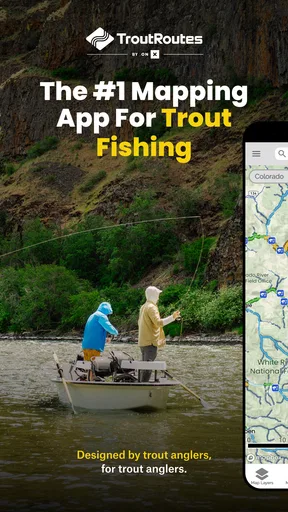
When I first opened the TroutRoutes app, I was greeted by a user-friendly interface that made navigation a breeze. The app is intuitively designed, so even if you’re not particularly tech-savvy, you’ll find it easy to use. The main screen provides a map view, which is the heart of the app. It’s like having a personal fishing guide right in your pocket!
Features That Hook You
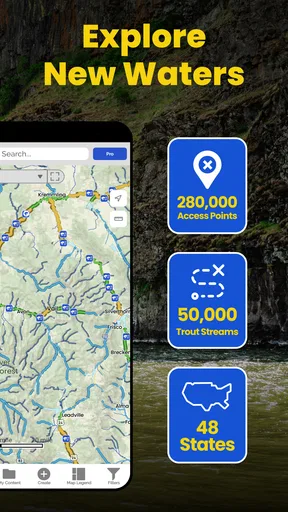
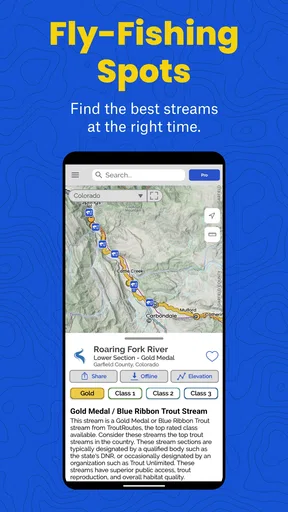
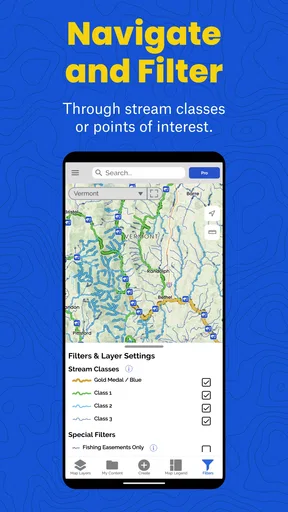
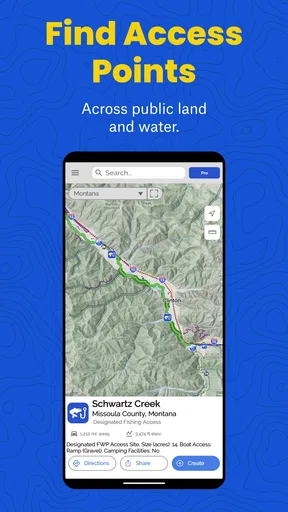
One of the standout features of TroutRoutes is its detailed mapping. The app covers numerous streams across several states, offering information on access points, fishing regulations, and even stream classifications. You can quickly zoom in on a particular area to get more granular details, which is super handy when planning a trip.
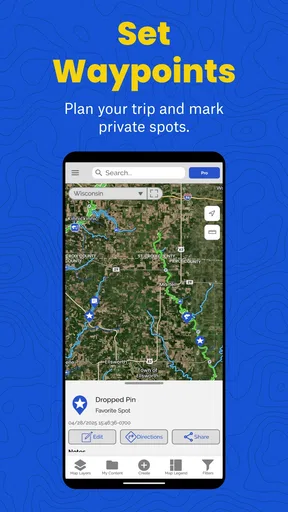
Another cool feature is the ability to save favorite spots. I found this particularly useful for keeping track of places I want to revisit. Plus, the offline access feature means you can still view your maps even when you’re deep in the woods with no cell service. This is a game-changer for those remote fishing trips.
Personalizing Your Fishing Experience
Let’s talk about customization. The app allows you to filter streams based on factors like size, access, and fish species. It’s perfect if you’re targeting a specific type of trout or prefer certain fishing conditions. I enjoyed experimenting with different settings to find streams that matched my preferences.
Additionally, the community feature is a great touch. You can connect with other anglers, share tips, and get advice on the best spots. It’s like having a community of fishing buddies at your fingertips, which adds a social element to the app that I really appreciate.
Using TroutRoutes in the Field
In practice, TroutRoutes is as effective as it is in theory. I decided to test it out on a weekend trip. With the app, I discovered a hidden gem I probably wouldn’t have found otherwise. The map’s precision was spot-on, and the ability to check access points ahead of time made my trip smoother.
What’s more, the app provides essential information about local fishing regulations. This ensures you’re fishing responsibly and legally, which is crucial for preserving these natural habitats. I found this feature particularly valuable, as it saved me from having to do separate research beforehand.
Cost, device fit and day-to-day reliability
TroutRoutes is a free app from onXmaps, with optional in-app purchases ranging from $9.99 to $58.99 per item. I would start by testing the free experience against the waters I actually fish rather than paying on the assumption that every feature will matter to me. The app has an average rating of 3.8 from around 560 ratings, which suggests a mixed but substantial response from users; I’d weigh that alongside my own needs, since map coverage and fishing habits differ.
It is rated for Everyone and has been available since June 6, 2019. The current version is 5.9.0, and it requires Android 8.0 or later. Those details matter if you plan to rely on an older phone: check compatibility before building a trip around it. On a supported device, I would still conserve battery by preparing the map before leaving, keeping screen checks brief and carrying a power bank for a long day. Constantly leaving a bright display on outdoors can drain a phone regardless of which mapping app is open.
For stability, my practical expectation is modest: treat the app as a useful reference, but do not make it the only way you can find your route or remember your plan. Save the areas you intend to consult, note key access details, and keep a backup navigation option for unfamiliar terrain. If the app closes or the phone runs low, that preparation gives you a way to recover without turning a fishing trip into a troubleshooting session. Offline access helps with coverage gaps, but it cannot replace a charged device or careful planning.
My performance verdict
For its specific job, I see the strongest performance in focused preparation: identify candidate trout water, compare the map details that matter to you, and carry the relevant information into the field. Heavy use—repeatedly scanning a broad area, switching between multiple locations and keeping the display active—will naturally ask more of both the user and the phone than a quick check before departure. I would not judge its value by whether it behaves like a full navigation suite; I would judge it by whether it helps me choose and understand fishing locations with less guesswork.
Coverage and personal preference are the key qualifications. An angler who finds the streams they need and likes the fishing-specific approach may consider the focused maps worth exploring. Someone who needs general driving directions, broad outdoor navigation or a tool for activities beyond trout fishing should keep a conventional map app in the mix or choose a broader alternative. My advice is to try the free option on a familiar outing first, learn how its map and saved information fit your routine, and only then decide whether an in-app purchase is worthwhile.
Final Thoughts: Is TroutRoutes Worth It?
After spending some quality time with TroutRoutes, I can confidently say it’s a must-have for any trout fishing enthusiast. The combination of detailed maps, personalization options, and a vibrant community makes it a versatile tool for both novice and experienced anglers.
Whether you’re planning a short afternoon trip or a week-long fishing adventure, TroutRoutes equips you with the knowledge you need to make the most of your time on the water. It’s like having a seasoned fishing guide who’s always ready to share the best spots.
So, if you’re looking to elevate your trout fishing game, give TroutRoutes a try. You might just find your new favorite fishing spot!
Pros
- Comprehensive stream maps for easy navigation.
- Offline access to maps for remote areas.
- Detailed hatch charts for planning trips.
- Community-sourced fishing reports.
- Customizable trip planning features.
Cons
- Limited coverage in some regions.
- Subscription required for premium features.
- Occasional GPS inaccuracies.
- Heavy battery usage during long sessions.
- Not optimized for tablet displays.
FAQs for TroutRoutes: Trout Fishing App
What features does TroutRoutes offer to enhance my fishing experience?
TroutRoutes provides a comprehensive set of features tailored for trout fishing enthusiasts. It includes detailed maps of public fishing lands, access points, and river conditions. The app also offers offline maps for remote locations, catch logs, and the ability to customize maps based on your preferences. These features are designed to enhance your planning and on-site fishing experience.
Is TroutRoutes available for both Android and iOS devices?
Yes, TroutRoutes is available for download on both Android and iOS platforms. This ensures that users can access the app regardless of their device preference. You can find it on the Google Play Store for Android devices and the Apple App Store for iOS devices, making it widely accessible to all trout fishing enthusiasts.
Does TroutRoutes require an internet connection to function properly?
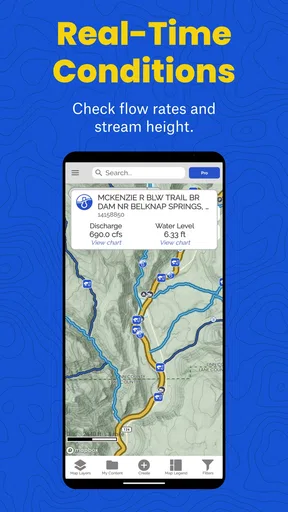
While TroutRoutes offers offline maps for areas where connectivity might be an issue, certain features, such as real-time river conditions and location-based services, require an internet connection. It's advisable to download the necessary maps and data in advance if you plan to fish in remote areas with limited connectivity.
Is there a subscription fee for using TroutRoutes, or is it free?
TroutRoutes operates on a freemium model. This means that while the app is free to download and offers a range of basic features at no cost, there are premium features available through a subscription. These may include advanced map layers, enhanced offline capabilities, and detailed catch logs, providing users with a more enriched experience.
How user-friendly is TroutRoutes for beginners in trout fishing?
TroutRoutes is designed to be user-friendly, catering to both beginners and experienced anglers. The intuitive interface helps users easily navigate through maps and features. The app also provides educational content and tips for those new to trout fishing, making it an excellent tool for learning and exploration.


